Published: · SpinCraft: Wood Workshop
SpinCraft: Wood Workshop — From an Idea to a Playable Workshop
How SpinCraft: Wood Workshop grew from a simple lathe idea into a full woodturning game, and what turned out to be hard along the way.
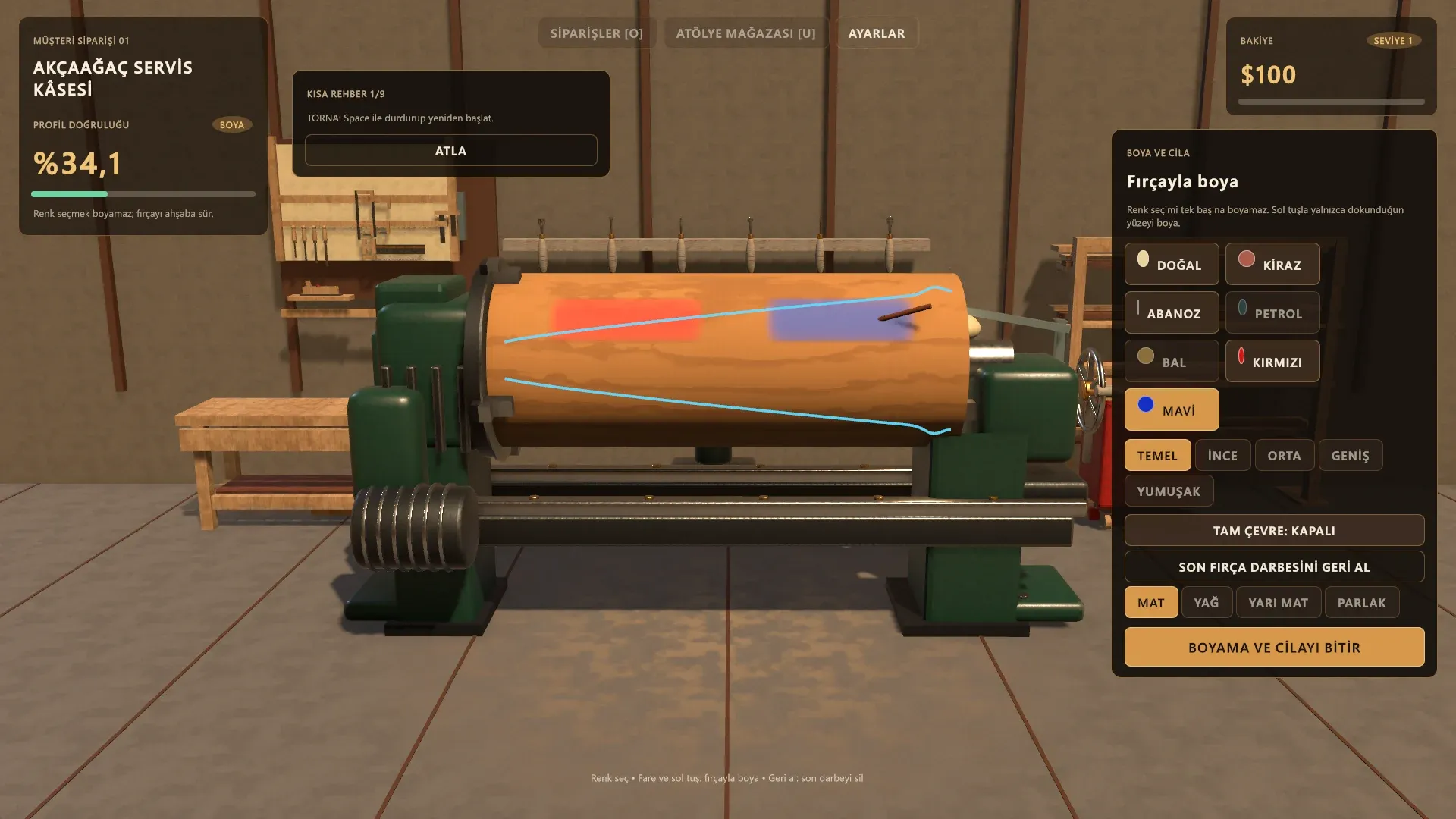
SpinCraft: Wood Workshop is out on itch.io, so this feels like a good moment to look back at how it was built and what we learned on the way.
The idea
We wanted a woodworking game where the main action is not a menu or a button but the work itself: a piece of wood spinning on a lathe and a chisel taking material off it, a little at a time. Calm, hands-on, and satisfying when the final shape comes out right.
That set the goal for everything else. If carving did not feel good, no amount of shops, upgrades or orders would save the game.
The lathe comes first
Everything starts at the lathe. The workpiece is a procedural mesh whose profile changes as you cut. Every pass removes real material, and once wood is gone it does not grow back, so going past the guide line costs you.
The first builds used a sparse workshop made of simple shapes and flat, plain wood. Over time the wood got a procedural grain, the target guide moved in front of the spinning stock so you can see where to stop, and the shavings were tied to the material you actually remove.
One small detail took longer than expected. Very thin, one-sample spikes could appear in the rendered wood. We now filter those out on the visual mesh only, without touching the real profile, so intentional sharp grooves and thin necks stay exactly as you carved them.
Six chisels
There are six turning chisels, each with its own cutting width and behaviour. You switch with Tab or the number keys, hold Shift for precise cuts and zoom in with the right mouse button. Each chisel has its own small icon drawn from the silhouette of its tip, so you can tell them apart at a glance.
Sanding and painting
In early versions, sanding and painting were simple effects that finished almost instantly. It did not feel like woodworking.
Sanding is now zone-based. The sanding block only works on the parts of the piece it actually touches: the piece is divided into 128 bands along its length, and each one keeps its own progress and quality. Finer grits (80, 120, 240 and 400) give a smoother result.
Painting went the same way. Picking a colour no longer paints the whole piece. You paint stroke by stroke with a brush, and each stroke remembers where it was placed around the piece, its width, opacity, colour and layer. You can paint a red band and a blue band and leave the wood natural in between. On top of that you choose a finish: natural matte, oil, satin or gloss.
Orders, the shop and selling
Customer orders give the game its structure. There are 21 of them: bowls, vases, chess pieces, candlesticks, table legs, handles and more.
In an earlier version, the orders were built from a handful of base shapes with small variations, and many of them started to feel the same. We replaced them with 21 hand-designed target silhouettes. The bowl and vase descriptions only describe the outer surface, because that is the part you actually shape on the lathe.
You are scored on accuracy, then you sell the piece. Money and experience unlock new wood species (pine, beech, oak, walnut, cherry, maple and mahogany), better chisels, lathe parts, sandpaper and finishes in the workshop store. We tuned the rewards so that painting stroke after stroke cannot create endless money, and a natural, unpainted piece is never punished.
If you just want to make something, free crafting mode has no customer and no target, and your creations are kept in a library.
What was hard
- Keeping saves working. As features were added, the save format had to change several times. Each change was written as a migration, so older progress, profiles and purchases carry over instead of being reset.
- Variety. Making 21 orders that look and feel different took more work than the cutting itself.
- Performance. Cutting, shavings, sanding and painting all update a live mesh and textures, so we kept measuring performance on a mid-range laptop graphics card while adding features.
Get it, and tell us what you think
SpinCraft: Wood Workshop is available on itch.io for Windows, with English and Turkish interface languages: zerqunastudios.itch.io/spincraft-wood-workshop
Player feedback matters a lot to us. If an order feels unfair, a tool feels wrong or something breaks, please tell us in the comments on the itch.io page or by email at zerquna.studios@gmail.com. Every message helps make the next update better.